


Groups in Higher Logic Vanilla: Running Community Programs at Scale
Groups support many of the most impactful programs that run through a community—from advisory boards and beta programs to regional engagement and partner collaboration.
Because of that range, Groups tend to carry more responsibility than their simple definition suggests. They’re the mechanism teams rely on to bring the right people together, manage access, and support programs with different goals and expectations.
As communities grow, those programs often multiply. Groups need to fit naturally into the broader community experience, remain straightforward to manage at scale, and support clear ownership without creating unnecessary administrative overhead.
This article explores the most common ways teams use Groups today and highlights the key capabilities Higher Logic Vanilla offers to support them.
Common Use Cases for Groups in Communities
One of the first considerations with Groups is the range of programs they’re expected to support.
In Vanilla, Groups are used across a wide variety of community initiatives, including:
- High-touch, structured programs such as customer advisory boards, beta or early-access programs, and steering committees. These typically involve a defined audience, clear expectations, and tighter control over membership and activity, with an emphasis on privacy, moderation, and deliberate membership management.
- Broad, ongoing engagement programs, like regional or chapter-based Groups, user cohorts, and partner communities. These Groups are often long-lived and numerous, requiring easy discovery and joining, simple bulk management, and minimal hands-on administration once established.
- Private or account-based Groups, where visibility and access control matter most. These are commonly used for strategic customers, internal coordination, or sensitive collaboration.
Most communities rely on a combination of these use cases, and in some cases run hundreds or even thousands of Groups at the same time. Each comes with different requirements around access, ownership, visibility, and the level of effort needed to maintain it.
To understand how Groups perform across these scenarios, it helps to look at a few core factors that apply regardless of use case: member experience, operational efficiency, ownership and governance, and flexibility in design.
Prefer a Quick Walkthrough?
If you’d rather see how Groups support these programs in practice, this short demo covers the same core capabilities.
Member Experience: Visibility and Discoverability of Group Activity
How visible Groups are to members plays a large role in whether they remain active over time.
In Vanilla, Group activity is designed to surface as part of the broader community experience rather than living behind a separate destination. Discussions and updates from the Groups a member belongs to appear alongside other community activity, so participation doesn’t depend on remembering to check individual Group pages.
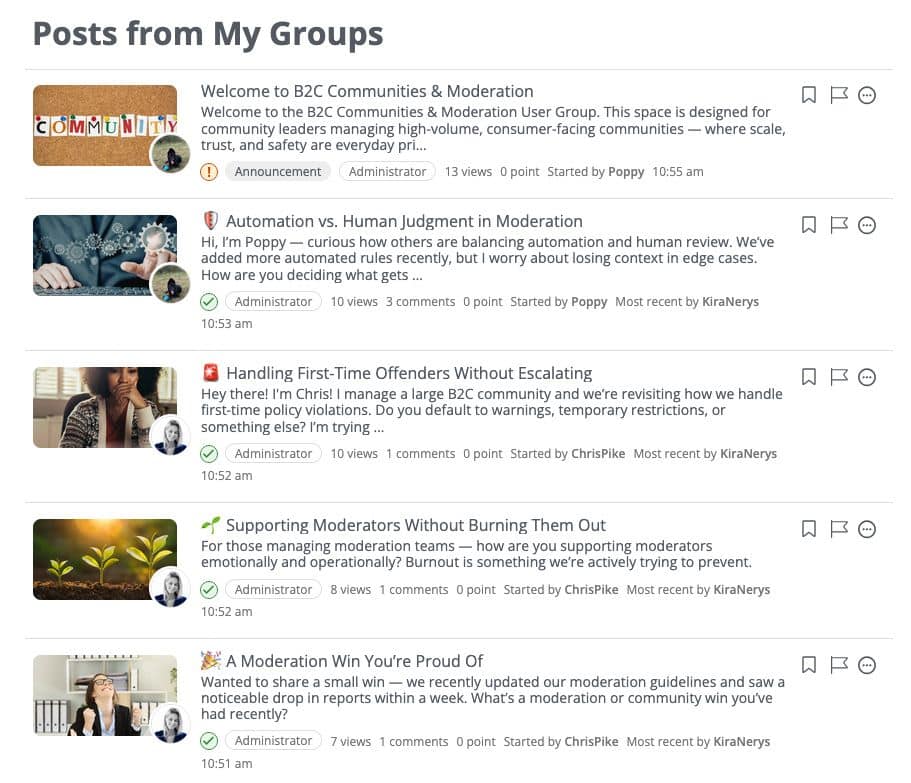
A Higher Logic Vanilla community member’s feed showing Group activity integrated with community updates and activity.
This helps members stay oriented between scheduled moments and reduces reliance on notifications or manual promotion to keep activity visible.
Operations: Managing Groups Without Ongoing Overhead
As the number of Groups increases, operational simplicity becomes just as important as member engagement.
In Vanilla, Groups are designed to be straightforward to manage at scale. Each Group includes a dedicated member management area that provides visibility into members, applicants, and invitations in one place. This makes it easier to understand who belongs to a Group, who is requesting access, and which actions require attention.
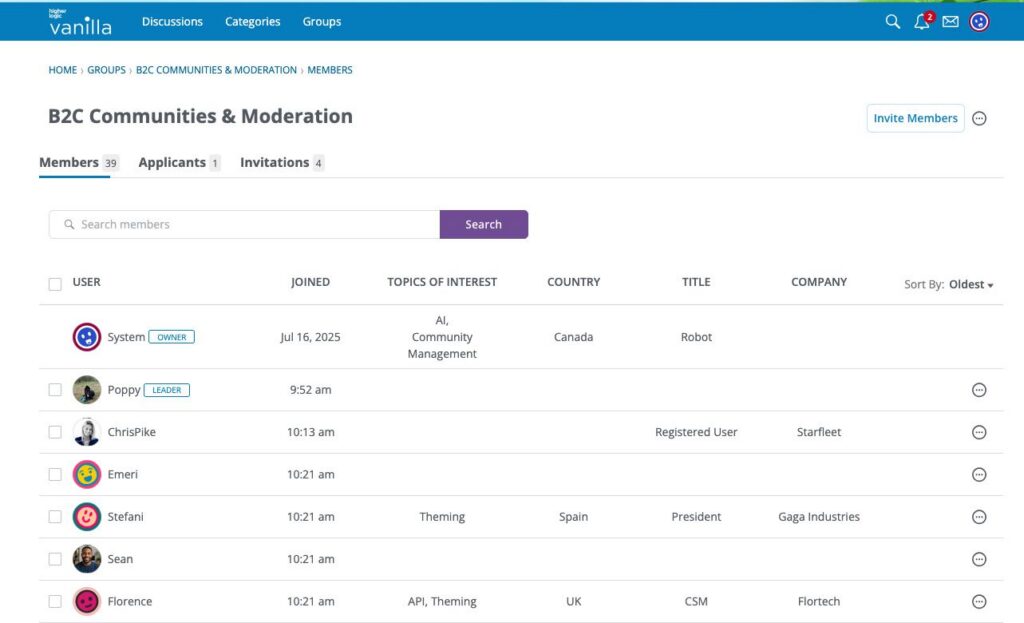
Higher Logic Vanilla Groups Member Directory provides full visibility into members, applicants, and invitees, with clear labeling of Owners and Leaders, and easy CSV exports.
Operational tasks that tend to create friction in other systems—approving requests, sending or resending invitations, exporting member data—are handled directly within the Group experience. This reduces the need for API work or manual reconciliation as Groups expand in size or number.
Automating Group Membership as Communities Grow
As Groups scale, manually managing membership isn’t always practical. In Vanilla, automation rules can be used to invite members to Groups automatically based on defined triggers, reducing the need for ongoing administrative intervention.
Teams can set up automation based on criteria such as profile fields, email domains, or time since registration. This makes it possible to connect members to the right Groups as soon as they join the community, without relying on manual assignment or one-off outreach.
Automation can also support longer-term engagement. Triggers based on how long a member has been registered can be used to introduce them to additional Groups, assign new roles, or surface new areas of the community over time.
Ownership and Governance: Defining Responsibility Clearly
As Groups scale, unclear ownership can quickly become a bottleneck, slowing programs down, increasing risk, and placing unnecessary strain on central admins.
In Vanilla, Groups are designed to distribute day-to-day management without losing oversight. Group Owners and Leaders can manage their own spaces, while admins maintain control through configurable permissions and guardrails.
Depending on how a Group is set up, Owners and Leaders may handle membership approvals, invitations, content moderation, and more directly within the Group.
Governance supports that distribution of ownership. Access levels, moderation capabilities, and visibility settings can be tailored to match internal policies or program requirements.
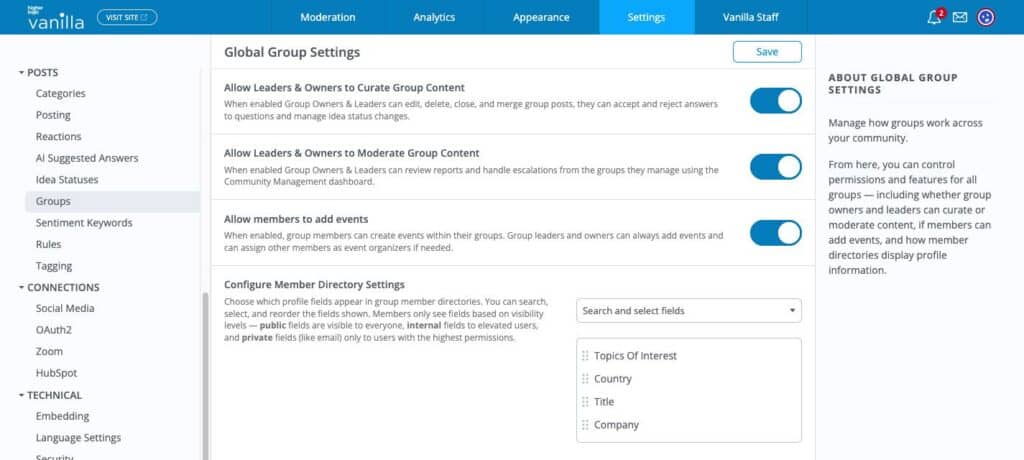
Higher Logic Vanilla Group permission settings
Flexibility: Designing Groups Around Purpose
Not all Groups are meant to function—or feel—the same.
In Vanilla, Groups can be designed to reflect the purpose of the program they support. Some benefit from prominent calls to action, event visibility, or curated content. Others work best with simpler layouts that prioritize discussion or peer connection.
Using Layout Editor, teams can customize both Group landing pages and individual Group views without relying on custom code. This makes it easier for Groups to evolve as programs change, while still maintaining consistency across the broader community experience.
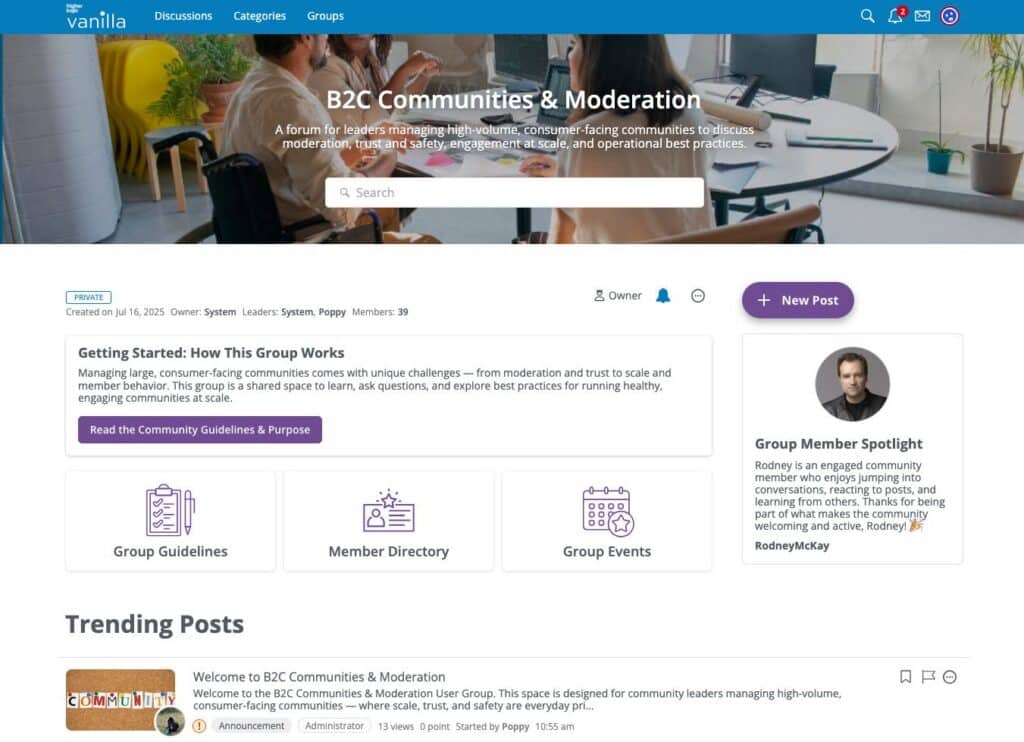
Example of a Higher Logic Vanilla Group homepage designed using Layout Editor with drag-and-drop widgets.
Want to See Groups in Action?
Explore how Vanilla Groups support different programs while remaining easy to manage as communities grow. Schedule a demo.