


Higher Logic Vanilla Zoom Integration: Host and Join Community Events in One Place
Register, join, and keep event conversations going—all from your community.

Higher Logic Vanilla’s Zoom integration lets members register for and join Zoom meetings and webinars directly from the community. Events stay connected to discussion before and after the live session, making it easier to drive engagement and continue the conversation.
Explore Higher Logic Vanilla’s integrations to see everything Vanilla works with.
For most organizations, events like webinars, training sessions, user groups, and town halls are a core part of how they engage customers or members. Too often, though, these moments live outside the community experience, managed in separate systems that make it hard to continue the conversation afterward.
Higher Logic Vanilla’s Zoom integration helps close that gap. It gives community managers the ability to let members register for and join Zoom events directly from the community, so everything feels connected.
If it’s a community-driven session — like an open Q&A or a user meetup — you can host the entire event inside your community. If it’s part of a broader marketing or education program, the community becomes another channel where members can easily discover and access it. Either way, the experience is cohesive. Members don’t have to leave the space they already know, and you don’t have to send them chasing links.
What the Integration Does
The Zoom integration connects your community’s event system directly with Zoom Meetings and Webinars. Once it’s enabled, you can create new Zoom events right from within your community or link existing ones.
When you post an event in Higher Logic Vanilla, members can see all the details, register in place, and—when it’s time—click “Join” without ever leaving the community. Behind the scenes, the integration passes registration information to Zoom, sends the standard confirmation email and calendar invite, and updates the event page automatically.
While not specific to the Zoom integration, Vanilla’s native event features add another layer of value. As members register, their names appear in the “Who’s Going” list on the event page, so attendees can see who else plans to join. For events that don’t require registration, members can mark themselves as “Interested,” creating a visible list of potential participants and helping generate early momentum around the session.
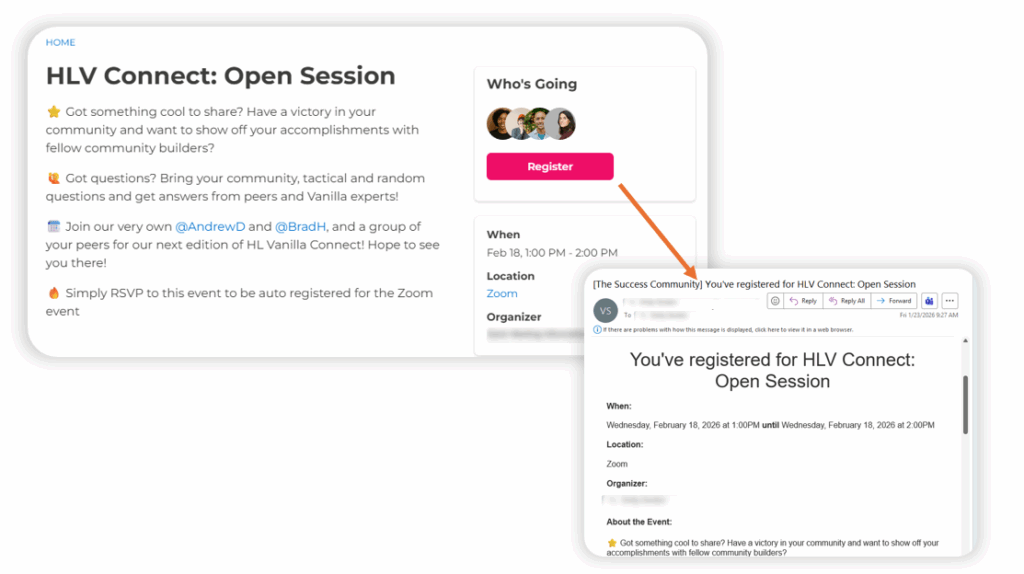
The Higher Logic Vanilla event page makes it easy to explore event details, see who’s attending, and register in one click. Once registered, Zoom automatically delivers a confirmation email with event details, a calendar invite, and the join link.
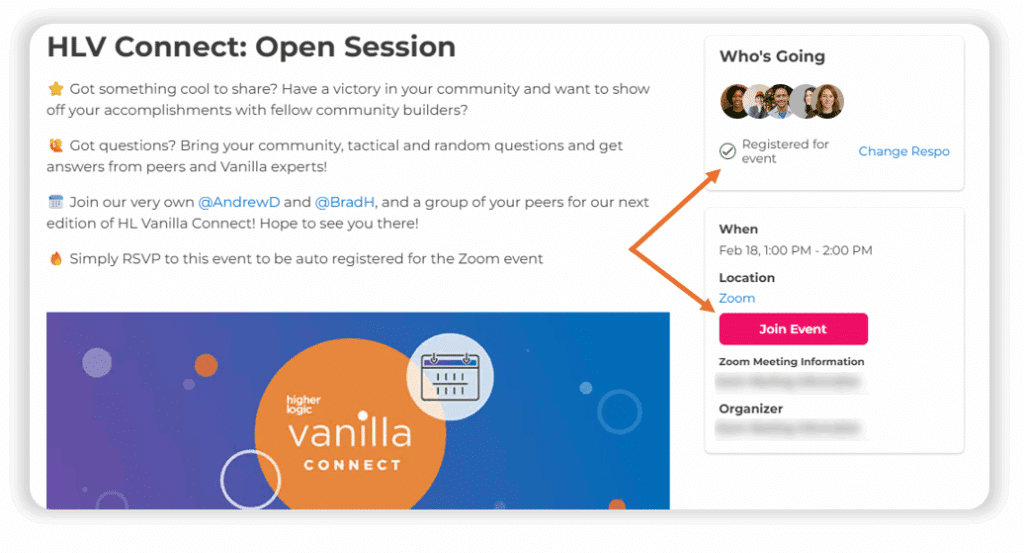
After a member registers, the event page updates with a “Join Event” button, making it easy to join the Zoom event directly from the community when it starts.
Teams can either link existing Zoom meetings by adding the meeting link or ID to a new event post, or create the Zoom meeting directly from within the community using a connected account. This flexibility supports different workflows and Zoom setups across teams.
Events can be created through your connected Zoom account or linked from another, giving flexibility across teams that use different Zoom setups. The integration uses Zoom’s OAuth framework for secure authentication, and admins can control who creates or links events to maintain consistent ownership.
Members get a consistent, reliable experience no matter how the event is created, and community managers save the back-and-forth of updating links, sending reminders, or tracking registrations across platforms.
How Teams Use It
The integration supports a range of community and organizational programs, including:
- Community-led sessions: Ideal for interactive programs like live Q&As, office hours, and informal member meetups.
- Webinars and education programs: Feature company-run webinars for marketing and product right alongside community content.
- Training and onboarding: Tie live training sessions to the learning paths or resources already in your community. After the call, participants can find follow-up materials or recordings in the same space.
- Advocacy programs: Engage advocates through kickoff calls, workshops, or recognition events.
- User groups, customer councils, and feedback sessions: Use the community to organize smaller, invite-only discussions.
- Partner or internal enablement: Run recurring sessions and updates for employees or partner networks.
Bringing Events and Community Closer Together
When your events and community work in sync, you get more from both. Members can find upcoming sessions where they already spend their time, register without extra steps, and join live events that feel connected to the conversations they’re already part of.
Afterward, the community becomes the natural place to share recordings, answer follow-up questions, and collect feedback that informs future sessions. Instead of an event ending when the Zoom call does, it lives on through discussion, shared takeaways, and new ideas.
For setup instructions and deeper technical details, visit our Zoom integration documentation.
Explore Higher Logic Vanilla’s integrations to see everything Vanilla works with.
