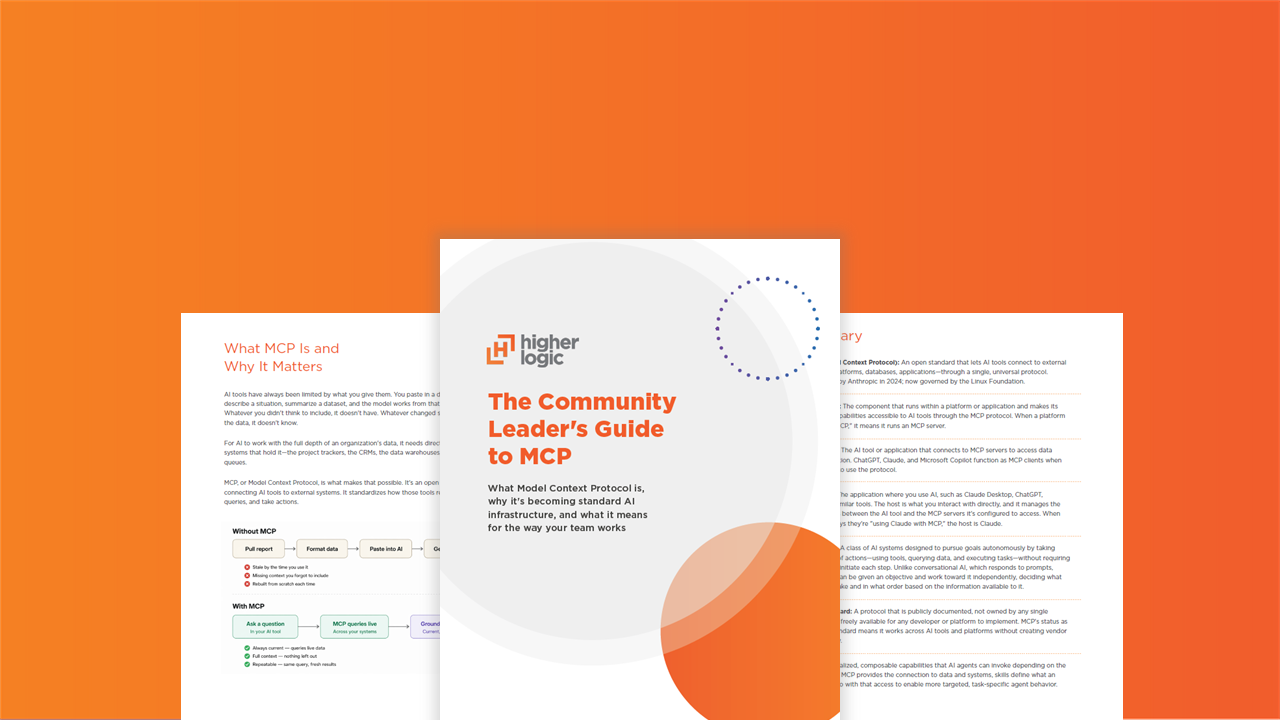
The Community Leader's Guide to MCP
Discover what MCP (Model Context Protocol) is, why it’s becoming standard AI infrastructure, and what it means for the way your team works

What MCP Is and Why It Matters
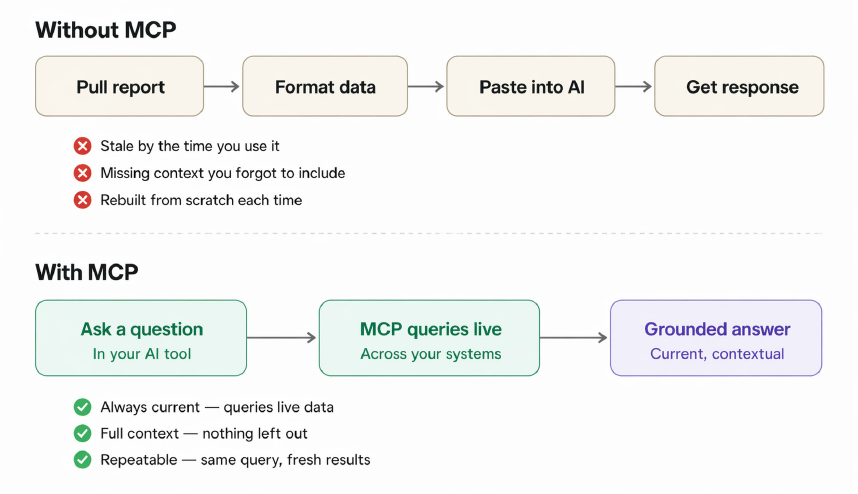
AI tools have always been limited by what you give them. You paste in a document, describe a situation, summarize a dataset, and the model works from that snapshot. Whatever you didn’t think to include, it doesn’t have. Whatever changed since you pulled the data, it doesn’t know.
For AI to work with the full depth of an organization’s data, it needs direct access to the systems that hold it—the project trackers, the CRMs, the data warehouses, the support queues.
MCP, or Model Context Protocol, is what makes that possible. It’s an open standard for connecting AI tools to external systems. It standardizes how those tools request data, run queries, and take actions.
The closest parallel is what APIs did for software integration. Before they became universal, connecting two systems meant custom work every time. APIs created a documented, reusable way for systems to talk to each other, and that became the baseline expectation for any serious platform. MCP is doing the same thing for AI. A platform builds the connection once; any compatible AI tool can use it.
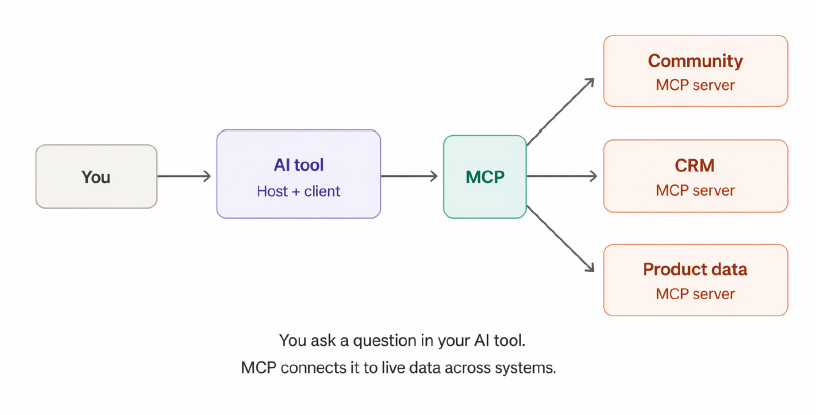
In practice, this means an AI tool can work from live data. And as agentic capabilities become increasingly available, these tools can do more than retrieve information. They can monitor conditions, respond to changes, and execute tasks across systems without someone manually orchestrating each step. MCP was introduced by Anthropic in late 2024 and has since been adopted across every major AI provider. Governance sits with the Linux Foundation, keeping it vendor-neutral. Thousands of MCP servers now exist across enterprise software categories, and new ones are being published daily.
What MCP Means for Community Teams
Community platforms have a lot to gain from MCP. They hold some of the richest, most continuously updated data in an organization. They give insight into what customers need, where they’re struggling, and how engaged they are.
That data is deeply relevant to business outcomes, but until now it’s been largely inaccessible to the third-party AI tools teams use every day. Working with that data through AI tools has meant manually pasting in reports, summarizing context, and reassembling the same input each time. Here’s what changes.
Tap Into Community Intelligence, On Demand
Rather than pulling a report or data export, formatting it, and pasting it into a prompt, a community manager can ask a question through their existing AI tool and receive an answer grounded in live community data.
Which enterprise accounts haven’t posted in the last 30 days? What topics generated the most engagement last quarter? Which questions from last week’s event are still unanswered?
These are natural-language questions that an AI tool with MCP access can answer directly, and the value extends beyond the community team. Customer success, marketing, product, and leadership teams can query the same community data through their own AI tools, making community intelligence accessible across the organization without anyone having to pull or share a report.
Ask Questions. Then Act on What You Find.
With governed access to the community platform, LLMs can query data and take action directly. Ask an AI tool to route a flagged post, tag a piece of content, or draft an onboarding message for a new member from a key account, and it can execute that task against live community data without you switching platforms or rebuilding context.
For teams using AI tools with built-in agent modes, this extends further. Recurring workflows like moderation routing, renewal reminders, and event follow-up can be configured to run autonomously. The depth of what’s possible here will depend on which AI tool you’re using and how developed its agentic capabilities are.
Surface Signals Proactively
An AI agent connected to your community platform doesn’t have to wait to be asked. For teams using AI tools with scheduling or agent capabilities, it can deliver dynamic readouts on a schedule, e.g., trending topics, emerging themes, a plain-language community health summary across key accounts.
It can also be configured to watch for specific conditions and surface them when they occur such as engagement trending down across a segment, a product topic spiking in discussion volume, or unanswered questions going stale.
Going Further: Connecting Multiple MCP-Enabled Systems
Each of the capabilities above becomes more powerful when your community platform isn’t the only MCP-enabled system in your stack. When your CRM, LMS, marketing tools, or your own product also have MCP servers, an AI agent can work across all of them simultaneously, correlating data that previously required manual cross-referencing between systems. This is where things are heading as MCP adoption matures, and it’s worth understanding the direction even if your stack isn’t fully there yet.
Consider one of the most common challenges for community teams: making the business case for community’s impact on revenue. The data to do this typically exists across two systems—community engagement in your platform and account and revenue data in your CRM—but connecting them today requires integration work or manual data exports. With both systems running MCP servers, an AI agent can pull community engagement data and CRM data together in the same query to correlate activity levels with ARR, renewal rates, or expansion revenue across your customer base.
Which engaged accounts renewed at higher rates? Which segments show the strongest correlation between community participation and contract growth? Which accounts in a specific tier or vertical are active in the community versus those that aren’t?
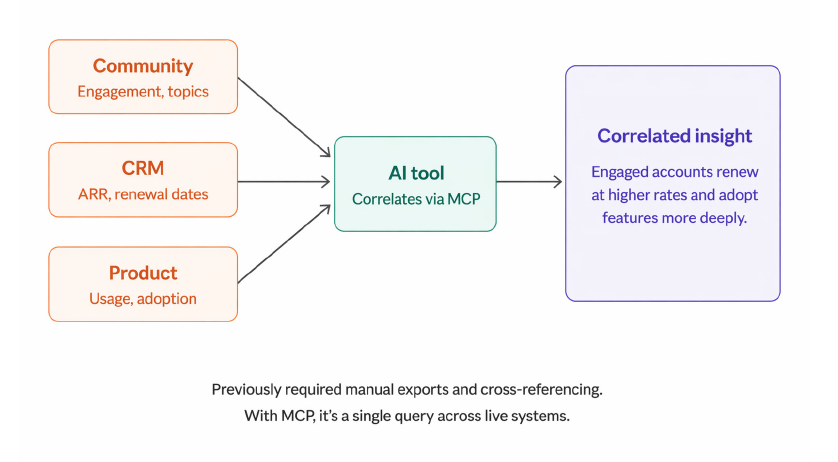
The principle extends as you add more systems. Connect community engagement, CRM, and product usage data and you can answer whether customers who participate in community adopt the product more deeply and generate more revenue. Add marketing automation and you can understand which community-active accounts respond better to campaigns and convert at higher rates. These are the correlations that change how leadership thinks about community investment, and they become accessible without a data team or custom reporting infrastructure.
Is Your Stack MCP Ready?
The MCP ecosystem has grown considerably in a short time. Many enterprise platforms have either launched MCP servers or have them in active development. There’s a reasonable chance some of the tools your organization already uses are MCP-capable or will be soon. Here are some useful questions to bring to your IT or engineering team:
- Do any of the platforms we currently use have MCP servers available? (Developer documentation and account reps are usually the fastest path to an answer)
- Are we building any internal MCP servers for our own products or data?
- Which of our systems currently require custom connector work each time we want to connect a new AI tool?
- Are there AI initiatives underway in our organization that would benefit from access to community data?
Having a sense of where your tech stack stands, even roughly, is useful context for evaluating new capabilities as they become available.
Prompting With Connected Community Data
Most prompting advice assumes you’re working with a static input, such as a document you uploaded or a situation you described. Community data is different. It’s large, continuously changing, and layered with context: who posted, where, when, about what, and in response to what. The AI can now reach all of that. How much value you get from it depends on how well you direct it. Here are some principles that hold up well against the specific characteristics of community data.
Specify the dimensions
Community data is multi-dimensional in ways that aren’t always obvious. A question like “What are the most common topics in the community?” will return something, but it flattens a dataset that varies enormously by audience segment, time period, content type, and space. A more effective prompt narrows the dimensions: “What product-related questions have enterprise-tier customers posted in the last 60 days that received no accepted answer?” The more precisely you define the population, timeframe, content type, and condition, the more useful the result. Think of it less like asking a question and more like scoping a query.
Define your terms
Community work runs on concepts that mean something very specific inside your organization but are genuinely ambiguous to a model. “At-risk account,” “declining engagement,” “active member,” and “escalation-worthy” all sound precise, but every team defines them differently. If you ask the model to identify at-risk accounts without specifying what that means, it will apply a reasonable-sounding generic definition and return results that look credible but may not reflect how your team evaluates risk.
Make the implicit explicit. Define the data sources and thresholds that constitute your version of the concept. An at-risk account might mean one where engagement has dropped below a specific level over a defined period, with a renewal date within a certain window, in a particular customer segment. The model can apply that logic precisely but only if you provide it.
Name what “good” looks like
Defining your terms tells the model what things are. This is about telling it what things mean—the evaluative layer that sits on top of your definitions. Community managers carry a tremendous amount of contextual knowledge about what signals matter. For example, they know which engagement patterns precede churn versus which ones are just seasonal dips, what kind of post tends to escalate versus fizzle out, which accounts look fine by the numbers but feel wrong based on experience. The model doesn’t have that institutional knowledge unless you provide it.
When you’re asking for analysis or recommendations, encode that expertise into the prompt. Tell the model what you’d pay attention to and why. The more of your judgment you make legible, the more the output reflects your thinking rather than a plausible approximation of it.
Prompt across both layers of the data
Community data is simultaneously quantitative and qualitative in a way that most business data isn’t. The same dataset contains behavioral signals—posting frequency, response times, login patterns—and content signals—what people are saying, the themes emerging, the sentiment underneath. Most people default to one mode or the other when they prompt. They ask for engagement metrics or they ask for a thematic summary.
But the leverage is in combining both: “Show me accounts where engagement has dropped over the last quarter, and identify the topics and sentiment in their recent posts.” That’s the difference between “this account is less active” and “this account is less active and their recent posts are about migration pain points,” which is a distinct input for a CS conversation. When you’re scoping a prompt, consider whether the question benefits from crossing the quantitative-qualitative line. Often it does.
Give the model a frame for interpretation
Community data is rich enough that pure retrieval—just surfacing what’s there—is often the least valuable thing an AI can do with it. The more useful move is asking for pattern recognition, comparison, or synthesis. Instead of “What did people say about the new feature launch?” try “Compare the sentiment and recurring concerns in discussions about the new feature launch across customer segments. Note anything that suggests a gap between how we positioned the feature and how customers are experiencing it.” You’re telling the model what kind of thinking to apply.
Account for the time dimension
Community data is cumulative and temporal. Conversations evolve. Topics spike and decay. A member’s engagement pattern over six months tells a different story than their activity last week. When your prompt doesn’t specify a timeframe, the model has to decide what’s relevant on its own, and its default may not match your intent. Be explicit. Are you looking for a current snapshot, a trend over time, a comparison between periods, or an anomaly against a baseline? The same underlying question can produce very different, and differently useful, answers depending on which of those you’re after.
Iterate with the data
When a prompt doesn’t return what you need, the instinct is to rewrite the question. Sometimes the better move is to explore the data itself. Ask the model what’s available: “What types of engagement data can you access for this account?” or “What content categories exist in this space?” Understanding the shape of what the model can see helps you ask better questions and occasionally reveals dimensions you didn’t think to query.
Building AI Skills for Community Work
If you have prompts you find yourself reusing for recurring tasks—account reviews, escalation triage, weekly health checks, event follow-ups—that’s where the concept of skills becomes relevant.
A skill is a structured, reusable instruction set that tells an AI model how to perform a specific task. Where a prompt is something you write in the moment, a skill is something you build once and invoke repeatedly. It defines the task, the data it draws from, the logic it applies, the format of its output, and any conditions that govern its behavior. It captures the context, criteria, and judgment that would otherwise live in your head or get rewritten each time.
For example, a community team that regularly prepares account health summaries for CS could build a skill that pulls a given account’s community engagement data—posting frequency, content topics, response rates, program participation—applies a scoring framework the team has defined, and produces a structured summary formatted for a CS handoff.
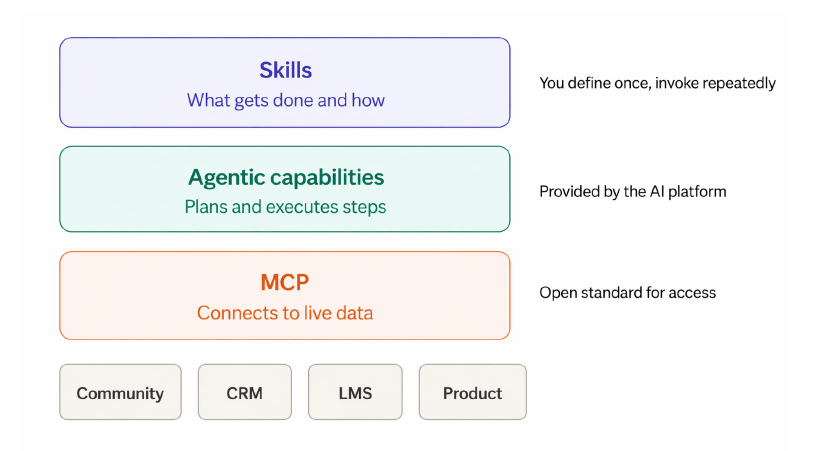
What separates a skill from a well-written saved prompt is the infrastructure it requires underneath. A skill like the one above needs the model to connect to live systems, reason through multiple steps, and execute them in sequence. That depends on two layers: MCP, which provides LLMs governed access to your data systems, and agentic capabilities (provided by the AI platform or tooling layer), which give the model the ability to plan and carry out multi-step tasks. Skills sit on top of both.
Skills as a term in this context isn’t standardized yet. You may see the same concept called custom instructions, system prompts, custom agents, or preconfigured workflows depending on the platform, and the tooling to build and manage them is still developing. But the underlying principle is the same: you define how a task should be done once, and the model can execute it with different inputs each time.
As MCP connections deepen and agentic capabilities mature, skills will likely become the primary way teams operationalize AI, via curated libraries of skills that reflect how a team works, what it values, and what it knows. Starting to think about which parts of your workflow are structured enough to encode—and what criteria and logic you’d want preserved—is a productive exercise even before you build anything.
The Opportunity Ahead
Community platforms generate a continuous stream of customer intelligence, but that data has historically been locked inside a system that other teams rarely access. The reports get shared selectively, the insights get translated manually, and the full depth of what the community captures stays underutilized.
MCP changes that dynamic. When community data is accessible through the same AI tools that product, CS, marketing, and leadership already use, the community platform shifts from a team-specific tool to an organizational intelligence source. The questions that other teams can now ask of community data—and the signals that can surface proactively—make the case for community’s impact in ways that a quarterly report never could.
For community professionals, this is a repositioning of the work itself. The teams that build familiarity now with understanding the landscape, identifying workflows worth systematizing, and developing fluency in directing AI effectively will be the ones best positioned to capture that shift as the tooling matures.
Download the PDF Guide
Understand how MCP is reshaping AI workflows, connected systems, and the future of community intelligence.