


How Higher Logic Vanilla’s Salesforce Integration Unifies Community Engagement and Customer Data
Sync engagement activity, streamline follow-up, and give teams clearer, more contextual customer insights
Higher Logic Vanilla’s Salesforce integration unifies community engagement and CRM data. It syncs contacts, logs community activity as Salesforce records, supports one-click lead and case creation, maps custom fields, and enables secure OAuth-based connections. Teams across customer success, support, sales, product, and marketing use these insights to improve customer health, case escalation, account visibility, product feedback loops, and executive reporting.
Explore Higher Logic Vanilla’s integrations to see everything Vanilla works with.
Your CRM captures the operational side of each customer relationship. Your community adds the conversations that reveal what people need, what they’re trying to solve, and how they’re interacting with others. When these sources of insight sit in separate systems, it’s easy to miss important context.
Higher Logic Vanilla’s Salesforce integration brings everything into one place. Community activity syncs directly into Salesforce, giving teams a clearer, shared view of each customer. You can see which accounts are active in the community, the topics they follow, and the discussions they’re participating in. This real-time context enriches account records, helping teams identify early signals of risk or advocacy, tailor outreach based on what customers are doing today, and draw a straight line between engagement patterns and outcomes like renewals or expansion.
What Higher Logic Vanilla’s Salesforce Integration Does
The integration connects Higher Logic Vanilla directly to Salesforce, making community engagement data available within Salesforce records.
Sync Community Profiles to Salesforce Contacts
Every community member in Vanilla can be linked to their corresponding Salesforce contact. When a user registers in your community or updates their profile, those changes automatically reflect in Salesforce.
Log Community Engagement as Salesforce Activity Records
Community engagement events—things like new discussions, comments, reactions, or group joins—appear in Salesforce as individual records tied to the correct contact and account. Each record includes the activity type, date, and a reference back to the original community post. This gives teams instant visibility into how customers are engaging, whether they’re asking for help, sharing advice, or participating in feature discussions.

A custom Salesforce object displays synced community activity from Vanilla, letting teams easily see registrations, posts, ideas, and other engagements tied to each contact or account.
Create Salesforce Leads or Cases Directly From Community Posts
Staff and moderators can create Salesforce leads or cases directly from community posts—for instance, a discussion that signals sales interest or a potential product issue. This removes manual copying and ensures follow-up actions start with the full context intact.
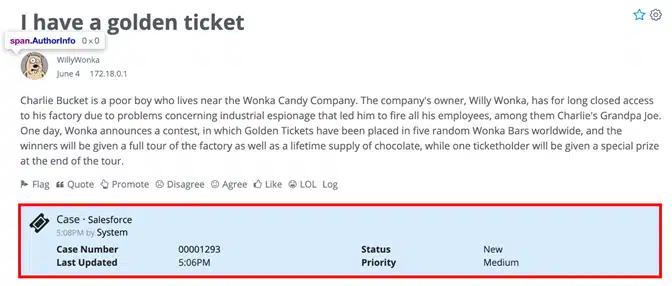
After a case is created through the Salesforce integration, its details appear on the originating community post—visible only to moderators—to support clear case tracking and follow-up
Map Custom Community Fields to Salesforce Contacts for Deeper Insights
Admins can map Vanilla profile fields to both standard and custom Salesforce contact fields. The sync can include details such as company, title, region, and any other profile attributes your community captures.
Secure Salesforce Integration With OAuth 2.0 and Token-Based Access
The integration uses Salesforce OAuth 2.0 for secure, token-based authentication. You can choose either a global connection (one Salesforce user for all community actions) or individual connections (each staff member connects their own Salesforce account).
Use Salesforce Reports and Dashboards to Analyze Community Engagement
All synced data is available to Salesforce dashboards and analytics tools. Teams can track engagement, customer health, and advocacy within reports, e.g., engagement by account, cases created via community, or correlations between participation and renewal rates.
How Different Teams Use Higher Logic Vanilla’s Salesforce Integration
Once the integration is connected, community activity starts appearing in the Salesforce views your teams already use.
How Customer Success Uses Community Engagement Insights in Salesforce
Community participation can provide early qualitative signals about customer needs. With the integration, a CSM can open an account in Salesforce and immediately see how users are engaging in the community. Are they posting questions? Helping others? Attending events? That context changes the tone of customer interactions. Instead of asking “How’s everything going?”, a CSM can say, “I saw your team has been really active in the community lately. How’s that working out for you?” It’s a small shift that builds trust and shows genuine attentiveness.
That visibility also helps your success team:
- Identify accounts that may need proactive outreach before issues escalate.
- Spot potential advocates based on consistent, positive participation.
- Use engagement data as an additional input when preparing for renewal or expansion discussions.
How Support Teams Escalate Community Issues Into Salesforce Cases
Support teams can create Salesforce cases directly from community posts. If a customer reports a product issue or bug in a discussion, moderators can escalate it into Salesforce with one click.
Each case carries full context—including the post, author, and related comments—so the support reps don’t have to dig through multiple tools. That means fewer missed details, shorter response times, and smoother collaboration between community moderators and support agents.
In addition, Vanilla’s Automation Rules can also create cases based on specific conditions. For example, you can trigger a case when a post goes unanswered for a set period, when a discussion has no activity, or when a post is reported. These automated workflows help ensure potential issues are captured without requiring manual monitoring of every discussion.
How Sales Teams Use Community Signals as Salesforce Lead and Account Insights
Community engagement can signal opportunity. If contacts at a prospective account are joining feature discussions or reacting to product updates, that’s a sign of strong interest. If they’re highly active after purchase, that can indicate satisfaction and a chance to expand usage or seat count.
Because those activities appear in Salesforce, reps can use them as conversation starters or even incorporate them into account-scoring models.
Here too, Automation Rules can extend the value of what surfaces in Salesforce. You can automatically create a lead when a post earns a certain number of points or when activity builds around specific product-related tags or categories. These signals make it easier for sales teams to spot momentum early and follow up with richer context.
How Product and Marketing Analyze Community Trends in Salesforce
For Product and Marketing teams, the integration quantifies what’s happening in the community. By pulling engagement data into Salesforce, they can analyze:
- Which product areas generate the most discussion or feedback.
- How engagement correlates with feature adoption.
- Which customers are influencing peers through helpful posts or answers.
These insights help guide roadmap prioritization, content planning, and customer advocacy programs.
How Leadership Measures Community Impact Through Salesforce Data
At the executive level, the integration provides what many organizations lack: a clear view of the business impact of community engagement. With data now in Salesforce, it’s possible to tie participation directly to outcomes like renewals, upsells, and customer health scores.
Leaders can answer questions like:
- Do highly engaged customers renew at higher rates?
- How much of our case volume is deflected by community content?
- Which accounts show the strongest correlation between engagement and growth?
A Closer Look at How Vanilla Passes Community Insights Into Salesforce
The integration is secure by design, using Salesforce’s OAuth 2.0 authentication and token-based connections that you can revoke or refresh at any time.
Data flows one way from the community to Salesforce to prevent accidental overwrites or conflicts. Only the data you configure is shared, and Salesforce remains the source of truth for account and contact information.
Each activity or update flows via a webhook-based process built for reliability and scale. Whether your community has hundreds or thousands of members, the sync happens quietly in the background without slowing down performance.
Admins also get flexibility in how it’s managed. Some organizations use a global connection, where one authenticated Salesforce user handles all communication between systems. Others prefer individual staff connections, where each moderator or community manager connects their own Salesforce account. Either approach works; it just depends on how you prefer to manage permissions and data visibility.
How to Set Up the Higher Logic Vanilla Salesforce Integration
Setup is straightforward and fast. Most teams can enable the integration, test it, and begin seeing results within a single session.
From the Higher Logic Vanilla dashboard, an admin enables the Salesforce add-on, authenticates through the OAuth flow, and selects which features to turn on—no custom code, middleware, or ongoing maintenance required.
For testing, you can connect your Vanilla staging environment to a Salesforce sandbox to verify data flow and confirm field mappings before production.
There’s a lot your community can do when it connects with the rest of your tools.
Explore Higher Logic Vanilla’s integrations to see everything Vanilla works with.
