


Higher Logic Vanilla Productboard Integration: Sync Community Ideas Into Product Management
Turn community ideation into Productboard insights that guide your roadmap.

Higher Logic Vanilla’s Productboard integration automatically syncs ideas, comments, and votes from your community’s ideation space into Productboard as product insights. Product teams can review customer feedback in context, prioritize feature requests, and connect community input directly to their product roadmap.
Explore Higher Logic Vanilla’s integrations to see everything Vanilla works with.
Customer communities naturally generate ideas, requests, and feature conversations. But turning that input into something actionable for your product team has traditionally meant manual exports, one-off messages, or shared spreadsheets.
Higher Logic Vanilla’s Productboard integration removes that friction. It connects your community’s Ideation space directly to Productboard, so ideas, comments, and votes flow automatically into your product management workflow. Your team can see what customers are asking for, prioritize the most requested features, and make decisions backed by user insight.
What the Integration Does
The Productboard integration connects directly with Higher Logic Vanilla’s Ideation feature, automatically syncing customer ideas, comments, and votes from your community into Productboard as insights. This gives the product team instant visibility into what customers are requesting most often and why. Each insight includes the original post content, the author’s name, and a link back to the discussion, so your product team can review feedback in context without switching tools or losing detail.
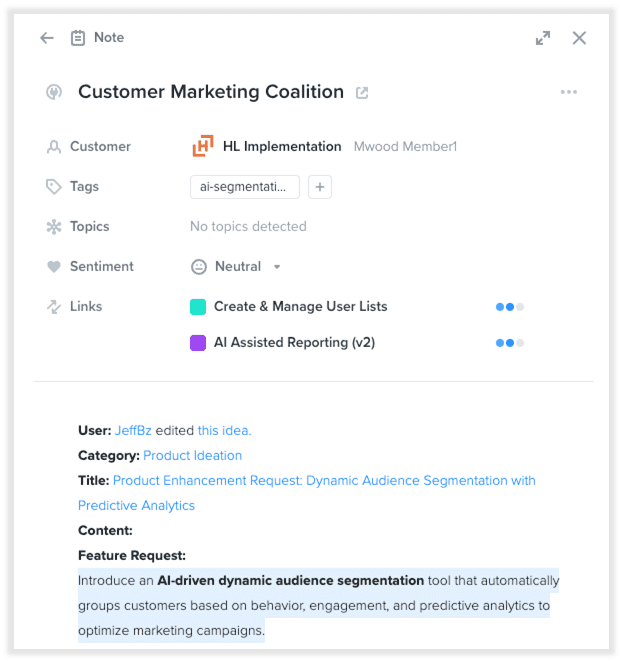
Example of a product idea from the Higher Logic Vanilla community synced to Productboard. The product manager has linked the idea to relevant projects in Productboard, shown in the “Links” section.
Once connected, the integration runs continuously. As new ideas and activity appear in your community, they’re instantly reflected in Productboard, ready for your team to review, group, or prioritize alongside input from other sources like support tickets or customer interviews.
You can also choose to embed your product roadmap—via Productboard portal—directly into Vanilla to give community members a transparent view of what’s planned, in progress, and launched.
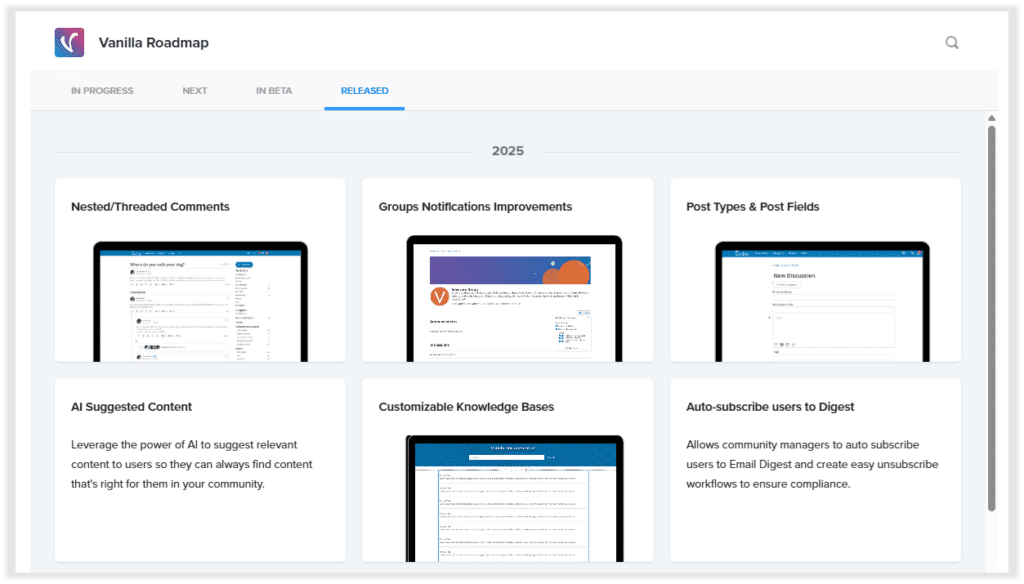
Higher Logic Vanilla’s product roadmap, displayed in Productboard’s Portal and embedded directly in our Success Community.
Members can click into each roadmap item to leave targeted feedback or rate how important a particular feature or improvement is to them.
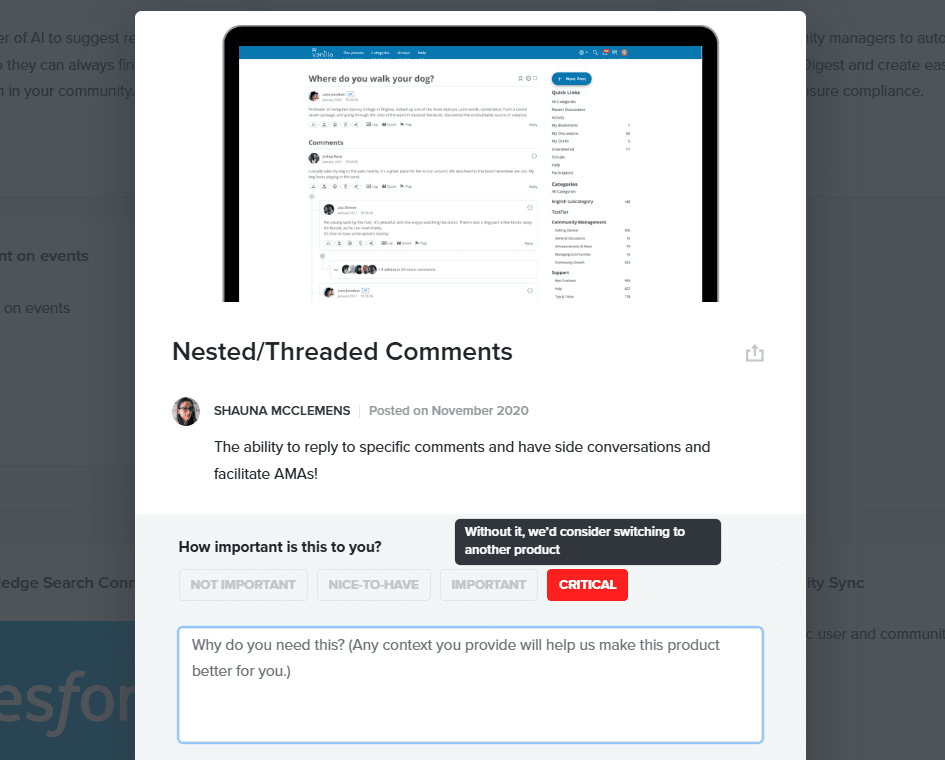
View of a selected feature request from the product roadmap, where users can rate its criticality and leave feedback in the comments
The integration uses a secure API connection between the two systems. It supports all major ideation activity — new ideas, comments, votes, and edits — and sends them to Productboard in near real time. Currently, syncing applies globally across the community and each comment creates its own note in Productboard.
Case Study: How Higher Logic Uses Ideation and Productboard
At Higher Logic, we use the Productboard integration within our own customer community, and it streamlines how our product team collects and prioritizes feedback.
See the exact process we use to take community feedback from idea to implemented feature.
Read the case study →
Add Automation to Support Your Productboard Workflow
Every idea submitted in your community is automatically sent to Productboard, where your product team can review it alongside other feedback. But sometimes it’s helpful to flag engagement directly inside Vanilla, especially when an idea starts gaining momentum.
With Higher Logic Vanilla’s automation rules, you can set up workflows to notify the right people when key events happen. For example, when an idea reaches a certain number of upvotes, Vanilla can automatically update its status (such as “In Review”) and send a custom email alert to your product managers.
This feature doesn’t change what gets sent to Productboard — all ideas still flow there — but it adds a layer of visibility and responsiveness inside your community. Product managers stay informed as ideas gain traction, ensuring nothing promising gets overlooked in day-to-day discussion.
For setup instructions and deeper technical details, visit our Productboard integration documentation.
Explore Higher Logic Vanilla’s integrations to see everything Vanilla works with.
